
Essential Emotions Postcard with Sample

An Empowered Living Resource

Essential Emotions Postcard with Sample

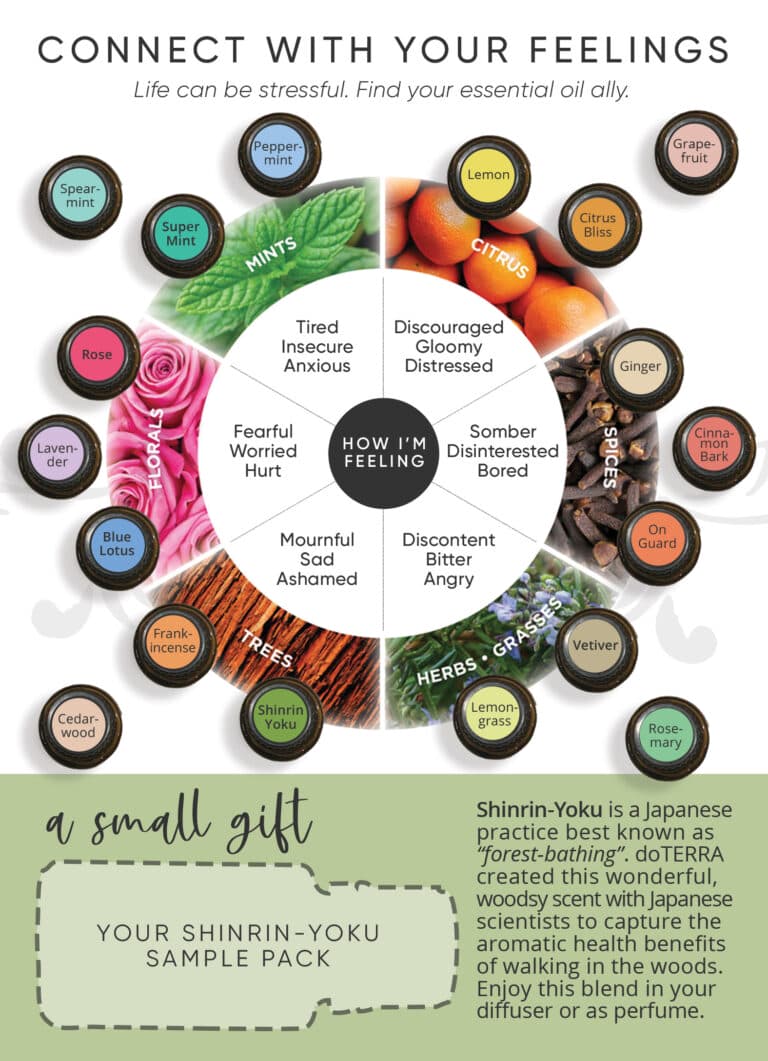
A good strategy for staying top-of-mind with your customers is giving them helpful resources that they will refer back to over and over again. This postcard combines that strategy with sampling, which gives a memorable, sensory experience. doTERRA’s emotional aromatherapy wheel is a useful, fun way to get customers engaged and thinking about how essential oils can help them. The original design for this graphic was used in our 2023 Christmas card, and we’ve included a Christmas version of this postcard as well, along with a Christmasy overlay you can add to a family photo for the front of the card.

Step-by-step guide

Here’s a step-by-step guide to setting up and sending out this postcard.

1. Print this design on a 5×7 postcard using a printing service like Vistaprint.

2. Buy essential oil sample packs. We buy ours from OilLife.com. Order a few more than you need in case you mess some up.

3. Print the custom ‘Shinrin-Yoku’ sample label from Avery. Order a few more than you need in case you mess some up. We use these 1×1.5 inch Avery labels.

4. Order envelopes slightly larger than 5×7 which will fit the postcard. Uline, Amazon, Michaels often have good prices. Also get rubber cement. Once all your supplies arrive, continue to step 5.

5. Very carefully, place the Shinrin Yoku stickers on the sample packs aligning it as best you can. There is no perfect alignment, but try to get it good enough. You may mess up a few, so print extra.

6. Put 6 drops of Shinrin-Yoku essential oil in each sample pack. With 6 drops per pack, one 15mL bottle can do 45 samples. Seal the sample pack with flat iron.
 
shinrin yoku sample
 

7. Using adhesive (like rubber cement), stick your finished Shinrin-Yoku sample packs onto your postcards in the dotted outline. It’s not a perfect fit.

8. To mail it out to your customers, put these postcards into envelopes slightly larger than the postcards. We purchased ours from Uline. Because there is a removable sample pack on the card, this piece needs an envelope to be sent.


Christmas Version

If you want to send this postcard out for Christmas, be sure to use the Christmas version of the postcard, which has a few differences to the wording to make it more seasonal.
 

There is also a family photo overlay pack included in the Christmas version which you can use to easily make the front of your Christmas postcard. If you’d like to do this, follow these steps:

1. Create a blank 5.125 x 7.125 inch canvas using an online image editing tool like Canva. Why the extra 0.125 inch? It’s called a bleed and it prevents your final print from having ugly white lines around the border.

2. Fill the canvas with your desired family photo.

3. In a new layer, add any one of our Christmas card overlays overtop of your image. Be sure that the overlay is centred and fills the entire width of the screen. There should be no space below or on the sides of the overlay. If the text is not visible enough, duplicate the overlay layer so that it is twice as dark below it.


4. When you’re finished, export the image in CYMK colour mode. This is a special colour setting for printed colours. Here’s a guide on how to do this in Canva.

5. Add this to the front of your 5×7 when printing and then add the Christmas version of the emotional aromatherapy wheel on the back. Rotate the backside by 90 degrees counter-clockwise (left side down) so that the sample is in the bottom corner when you place it in the envelope.

Matching Christmas Postcard Front Example 2
Matching Christmas Postcard Front Example 1

Video Guide For Printing & Editing Postcards

NOTE: This is a general guide, not a specific guide. You can use the principles you learn from this video guide to make this postcard.